プログラム導入編([初歩]PHP/HTML)
この記事では、
・Webサイトの操作上で使ったプログラムを紹介します。(PHPに特化)
・私も初めての時イメージすらできなかった為、基礎の基礎を解説しています。
・参考にしていただければ幸いです。
IT初心者の方でも、この記事イメージを持っていただければ幸いです。
※ 本記事のプログラムは一応動作確認していますが、正しく動作を保証するものではありません。
よって使われる際は、”自己責任”でお願いします。
コマンド事例([初歩]PHP/HTML)
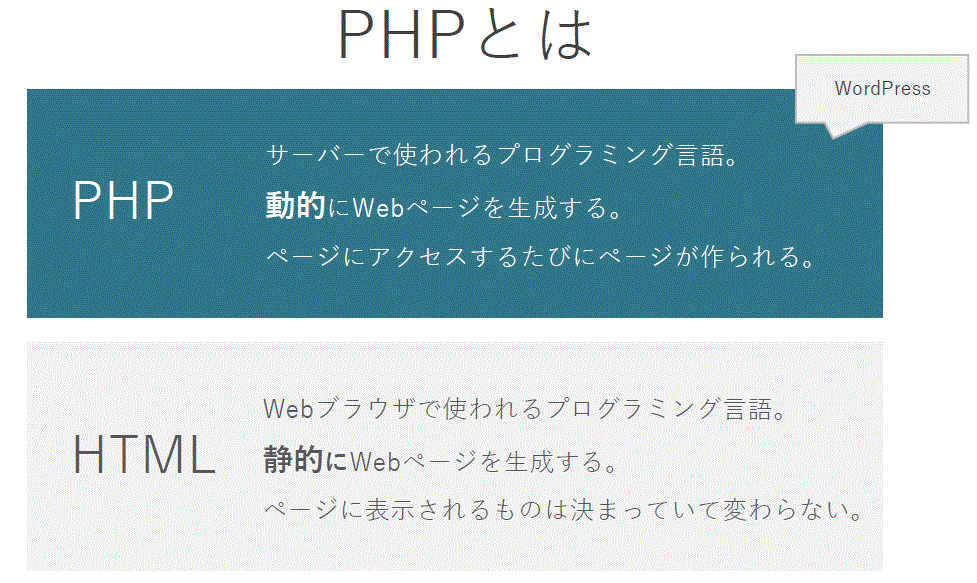
コード記載例
実際の記述サンプルを紹介します。
<?php
    echo "HelloPHP";
?>
---------------------------------
<!DOCTYPE html>
<html>
<head>
  <meta charset="UTF-8">
  <title>sample2-2.html</title>
</head>
<body>
  <h1>PHPをHTMLの中に埋め込む</h1>
  <p><?php
    echo "これはPHPで出力した文章です。";
?></p>
</body>
</html>
-----------------------------------
<?php
    echo <<<DOCUMENT
    <!DOCTYPE html>
    <html>
    <head>
      <meta charset="UTF-8">
      <title>sample2-3.html</title>
    </head>
    <!--複数行あるHTMLを記述する場合 -->
    <body>
      <h1>PHPをHTMLの中に埋め込む</h1>
      <p>これはヒアドキュメントで出力した文章です。</p>
    </body>
    </html>
    DOCUMENT;
?>
------------------------------------------条件をコメント文で記載しました。
<?php
// example3-1.php
// 閏年を計算する
// 西暦年が4で割り切れる年は閏年
// ただし、西暦年が100で割り切れる年は閏年ではない
// しかし、西暦年が400で割り切れる年は閏年
$year=2023;
echo "{$year}年は";
if(($year%4 == 0 && $year%100 != 0 ) || $year%400 == 0 )
{
echo "閏年です。";
}else{
echo "閏年ではありません。";
}
?>//学生情報を追加・編集・削除・更新の例
本体
<?php
require_once("common.php");
show_top();
// 学生一覧の表示
$member = $dbm->get_allstudents();
if ($member != null) {
show_student_list($member);
}
echo "<a href=\"student_input.php\">学生情報の追加</a>";
show_bottom();
?>
common.php
<?php
require_once("common/html_functions.php");
require_once("common/dbmanager.php");
require_once("common/data_check.php");
// エラーの取得関数
function get_error() {
$error = "";
if (isset($_GET["error"])) {
$error = $_GET["error"];
}
return $error;
}
$dbm = new DBManager();
?>
post_data.php
<?php
require_once("common.php");
if (isset($_POST["data"])) {
$data = $_POST["data"];
// POSTで送られたデータ取得
if (isset($_POST["id"])) {
$id = (int)$_POST["id"];
}
if (isset($_POST["name"])) {
$name = $_POST["name"];
}
if (isset($_POST["grade"])) {
$grade = (int)$_POST["grade"];
}
if (isset($_POST["old_id"])) {
$old_id = (int)$_POST["old_id"];
}
// データ挿入処理
if ($data == "create" ){
if (check_input($id, $name, $grade, $error) == false) {
header("Location: student_input.php?error={$error}");
exit();
}
if ($dbm->if_id_exists($id) == true) {
$error = "すでに使用されているIDです";
header("Location: student_input.php?error={$error}");
exit();
}
if ($dbm->insert_student($id, $name, $grade) == false) {
$error = "DBエラー";
header("Location: student_input.php?error={$error}");
exit();
}
header("Location: index.php");
exit();
// データ更新処理
} else if ($data == "update") {
if (check_input($id, $name, $grade, $error) == false) {
$error = "入力エラー";
header("Location: student_update.php?error={$error}&id={$old_id}");
exit();
}
if ($dbm->if_id_exists($id) == true and $id != $old_id) {
$error = "すでに使用されているIDです";
header("Location: student_update.php?error={$error}&id={$old_id}");
exit();
}
if($dbm->update_student($id, $name, $grade, $old_id) == false){
$error = "DBエラー";
header("Location: student_update.php?error={$error}&id={$id}");
exit();
}
header("Location: index.php");
exit();
// データ削除処理
} else if($data == "delete") {
$id = $_POST["id"];
if($dbm->delete_student($id) == false){
$error = "DBエラー";
header("Location: student_delete.php?error={$error}&id={$id}");
exit();
}
header("Location: index.php");
exit();
} else {
// それ以外ならトップページに戻る
header("Location: index.php");
exit();
}
}else{
// 不正アクセスの場合トップのページに戻る
header("Location: index.php");
exit();
}
?>
student_delete.php
<?php
// 情報削除画面
require_once("common.php");
$id = $_GET["id"];
$member = $dbm->get_student($id);
show_top("情報削除");
show_delete($member);
show_bottom(true);
?>
student_edit.php
<?php
// 情報編集画面
require_once("common.php");
$id = $_GET["id"];
$member = $dbm->get_student($id);
show_top("選択情報");
show_student($member);
show_operations($id);
show_bottom(true);
?>
student_input.php
<?php
// 情報入力画面
require_once("common.php");
show_top("学生情報の追加");
show_input();
show_bottom(true);
?>
student_update.php
<?php
// 情報更新画面
require_once("common.php");
$old_id = $_GET["id"];
$member = $dbm->get_student($old_id);
$id = $member["id"];
$name = $member["name"];
$grade = $member["grade"];
show_top("情報更新");
show_update($id, $name, $grade, $old_id);
show_bottom(true);
?>
style.css
/* h1の色を赤に */
h1{
color: red;
}
/* バックグラウンドを黄色に */
body {
background-color: yellow;
}
/* リンクに下線を引かない */
a{
text-decoration: none;
}
/* リンクの文字を青にする */
a:link, a:visited, a:active{
color: blue;
}
/* リンクの文字にマウスが乗った時には入りを赤にする */
a:hover {
color: red;
font-weight: bold;
}
dbmanager.php
<?php
class DBManager {
// データベースアクセス情報
private $access_info;
// データベースのユーザー名
private $user;
// データベースのパスワード
private $password;
// データベース
private $db = null;
// コンストラクタ
function __construct() {
$this->access_info = "mysql:host=localhost;dbname=school";
$this->user = "root";
$this->password = "root";
}
// データベースへの接続
private function connect() {
$this->db = new PDO($this->access_info, $this->user, $this->password);
}
// データベースへの接続解除
private function disconnect() {
$this->db = null;
}
// 学生一覧の取得
function get_allstudents() {
try {
$this->connect();
$stmt = $this->db->prepare("SELECT * FROM student ORDER BY id;");
$res = $stmt->execute();
if ($res) {
$member = $stmt->fetchAll();
$this->disconnect();
return $member;
}
} catch(PDOException $e) {
$this->disconnect();
return null;
}
$this->disconnect();
return null;
}
// 特定の学生情報の取得
function get_student($id) {
try {
$this->connect();
$stmt = $this->db->prepare("SELECT * FROM student WHERE id = ? ;");
$stmt->bindParam(1, $id, PDO::PARAM_INT);
$res = $stmt->execute();
if ($res) {
$member = $stmt->fetchAll();
$this->disconnect();
if (count($member) == 0) {
return null;
}
return $member[0];
}
} catch(PDOException $e) {
$this->disconnect();
return null;
}
$this->disconnect();
return null;
}
// $idで指定した学生情報が存在するかを調べる
function if_id_exists($id) {
if ($this->get_student($id) != null) {
return true;
}
return false;
}
// 学生情報の挿入
function insert_student($id, $name, $grade) {
try {
$this->connect();
$stmt = $this->db->prepare("INSERT INTO student VALUES(?, ?, ?);");
$stmt->bindParam(1, $id, PDO::PARAM_INT);
$stmt->bindParam(2, $name, PDO::PARAM_STR);
$stmt->bindParam(3, $grade, PDO::PARAM_INT);
$res = $stmt->execute();
$this->disconnect();
return true;
} catch(PDOException $e) {
$this->disconnect();
return false;
}
$this->disconnect();
return false;
}
// 学生情報の削除
function delete_student($id) {
try {
$this->connect();
$stmt = $this->db->prepare("DELETE FROM student WHERE id = ?;");
$stmt->bindParam(1, $id, PDO::PARAM_INT);
$res = $stmt->execute();
$this->disconnect();
return true;
} catch(PDOException $e) {
$this->disconnect();
return false;
}
$this->disconnect();
return false;
}
// 学生情報の更新
function update_student($id, $name, $grade, $old_id) {
try {
$this->connect();
$stmt = $this->db->prepare("UPDATE student SET id = ?, name = ?, grade = ? WHERE id = ?;");
$stmt->bindParam(1, $id, PDO::PARAM_INT);
$stmt->bindParam(2, $name, PDO::PARAM_STR);
$stmt->bindParam(3, $grade, PDO::PARAM_INT);
$stmt->bindParam(4, $old_id, PDO::PARAM_INT);
$res = $stmt->execute();
return true;
} catch(PDOException $e) {
$this->disconnect();
return false;
}
$this->disconnect();
return false;
}
}
?>
html_functions.php
<?php
// HTML上部を表示する関数
function show_top($heading="学生一覧") {
echo <<<TOP
<html>
<head>
<title>学生データベース</title>
<link rel="stylesheet" href="style.css">
</head>
<body>
<h1>{$heading}</h1>
TOP;
}
// HTML下部を表示する関数
function show_bottom($return_top=false) {
// $return_topがtrueなら、トップに戻るリンクを付ける
if ($return_top == true) {
echo <<<BACK_TOP
<br>
<br>
<a href="index.php">学生一覧に戻る</a>
BACK_TOP;
}
echo <<<BOTTOM
</body>
</html>
BOTTOM;
}
// 入力フォームを表示する関数
function show_input() {
show_edit_input_common("", "" ,-1, "", "create", "登録");
}
// 削除フォームを表示する関数
function show_delete($member) {
if($member != null) {
show_student($member);
}
$error = get_error();
echo <<<DELETE
<form action="post_data.php" method="post">
<p>この情報を削除しますか?</p>
<p>{$error}</p>
<input type="hidden" name="id" value="{$member["id"]}"/>
<input type="hidden" name="data" value="delete"/>
<br>
<br>
<input type="submit" value="削除">
</form>
DELETE;
}
// 更新フォームを表示する関数
function show_update($id, $name, $grade, $old_id) {
show_edit_input_common($id, $name, $grade, $old_id, "update", "更新");
}
// 挿入フォーム・更新フォームを表示する関数
function show_edit_input_common($id, $name, $grade, $old_id, $data, $button){
$error = get_error();
// フォームの上部を表示
echo <<<INPUT_TOP
<form action="post_data.php" method="post">
<p>学生番号</p>
<input type="text" name="id" placeholder="例)1001" value="{$id}">
<p>名前</p>
<input type="text" name="name" placeholder="例)山田太郎" value="{$name}">
<p>学年</p>
<select name="grade">
INPUT_TOP;
// optionタグの表示(選択されたものにはselectedをつける)
for($i = 1; $i <= 3; $i++){
echo "<option value=\"{$i}\"";
if($i == $grade){
echo " selected ";
}
echo ">";
echo $i;
echo "</option>";
}
// フォームの下部を表示
echo <<<INPUT_BOTTOM
</select>
<p>{$error}</p>
<input type="hidden" name="old_id" value="{$old_id}">
<input type="hidden" name="data" value="{$data}">
<br>
<br>
<input type="submit" value="{$button}">
</form>
INPUT_BOTTOM;
}
// 学生一覧を表示する関数
function show_student_list($member){
// テーブルのトップを表示
echo <<<TABLE_TOP
<table border="1" style="border-collapse:collapse">
<tr>
<th>学生番号</th><th width="100px">名前</th><th>学年</th>
</tr>
TABLE_TOP;
foreach($member as $loop){
// ヒアドキュメントでデータを表示
echo <<<END
<tr align="center">
<td>{$loop["id"]}</td>
<td><a href="student_edit.php?id={$loop["id"]}">{$loop["name"]}</a></td>
<td>{$loop["grade"]}</td>
</tr>
END;
}
// テーブルの下部分の表示
echo <<<TABLE_BOTTOM
</table>
<br>
TABLE_BOTTOM;
}
// 特定の学生情報を表示する関数
function show_student($member){
// テーブルのトップを表示
echo <<<STUDENT
<table border="1" style="border-collapse:collapse">
<tr>
<th>学生番号</th><th width="100px">名前</th><th>学年</th>
</tr>
<tr align="center">
<td>{$member["id"]}</td>
<td>{$member["name"]}</td>
<td>{$member["grade"]}</td>
</tr>
</table>
<br>
STUDENT;
}
// 編集画面の操作の一覧を表示する関数
function show_operations($id){
echo <<<OPERATIONS
<a href="student_update.php?id={$id}">変更</a>
<br>
<a href="student_delete.php?id={$id}">削除</a>
OPERATIONS;
}
?>
data_check.php
<?php
function check_input($id, $name, $grade, &$error) {
$error = "";
// 空欄がないかどうかのチェック
if ($id === "" or $name === "") {
$error = "入力されていない値があります";
return false;
}
// idが正しく入力されているかをチェック
if (preg_match("/^[1-3][0-9]{3}$/", $id) != true) {
$error = "idには1~3から始まる4桁の整数を入力してください";
return false;
}
return true;
}
?>まとめ
最後まで閲覧いただきありがとうございます。ご参考にしていただければ幸いです。